When we learn AWS, we usually study each service separately: EC2, RDS, S3, VPC…
But real engineering starts when we understand how they connect to each other to form a scalable, secure, production-ready architecture.
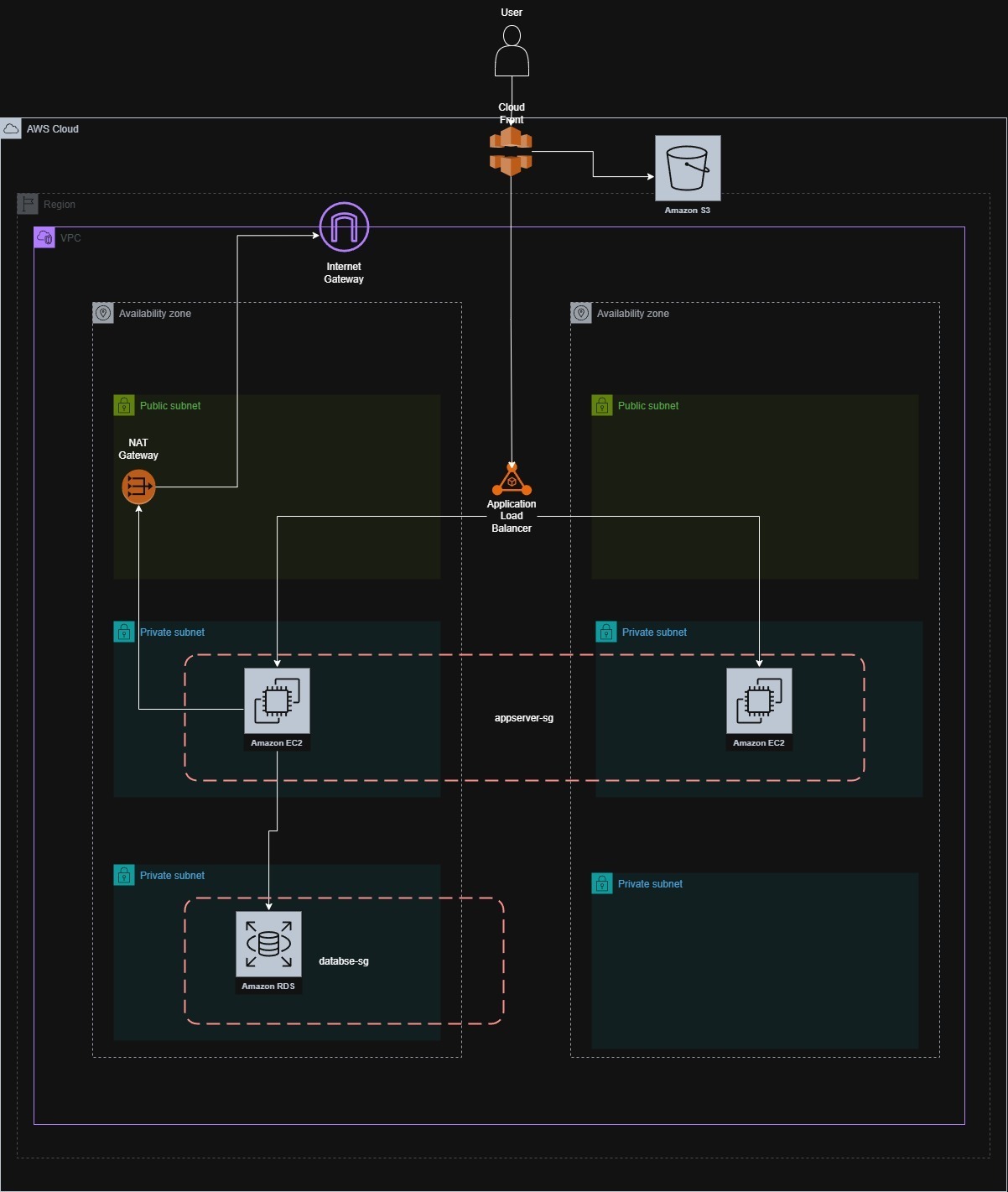
In this article I walk through a modern architecture for web applications based on best practices.
Goal of the architecture
Design an infrastructure that is:
- Highly available
- Scalable
- Secure
- Cost-optimized
- Production-ready
Entry point: Route 53 + CloudFront
When a user types the domain into their browser, the correct flow is:
- Route 53 resolves the domain.
- The domain points to CloudFront.
- CloudFront checks whether the content is cached at a nearby Edge Location.
- If it’s cached, it’s served immediately.
- If it isn’t cached, CloudFront queries the origin.
Note: Not all traffic enters the VPC. CloudFront acts as the first layer of optimization and protection.
Static content: S3 as origin
For static content such as:
- HTML
- CSS
- JavaScript
- Images
- Frontend assets
CloudFront uses Amazon S3 as the origin.
This gives you:
- Low global latency
- Reduced backend load
- Lower operating cost
- Better user experience
Note: In many cases, the entire frontend can be served from S3 + CloudFront without ever touching the VPC.
Dynamic content: ALB as origin
When a request requires business logic (API, authentication, database):
CloudFront forwards the request to the Application Load Balancer (ALB).
Dynamic flow:
User → Route 53 → CloudFront → ALB → EC2 → RDS
This is where we actually enter the VPC.
VPC: our private network
The VPC defines:
- IP range
- Public subnets
- Private subnets
- Route tables
- Gateways
Note: It’s the isolated environment where our application lives.
Public subnets
In the public subnets we typically find:
- Application Load Balancer
- NAT Gateway
- Internet Gateway (at the VPC level)
Note: The ALB receives traffic from CloudFront — not directly from users.
Private subnets (application layer)
This is where the instances live:
- EC2 running our backend
- Auto Scaling Group (recommended)
Characteristics:
- No public IP.
- Only receive traffic from the ALB.
- Can reach the internet through the NAT Gateway.
Note: This significantly reduces the attack surface.
Private subnets (data layer)
The database (Amazon RDS) sits in separate private subnets.
Best practices applied:
- Multi-AZ for high availability
- No public access
- Restricted Security Groups
- Automatic backups
Note: Separating application and data improves both security and organization.
NAT Gateway
Instances in private subnets may need external access to:
- Download dependencies
- Consume external APIs
- Apply updates
Note: The NAT Gateway allows controlled outbound internet access without exposing the instances.
Layered security
This architecture applies key principles:
- CDN as the first barrier
- Separation by layers
- Principle of least privilege
- Database never exposed
- Private instances
- Multi-AZ load balancing
Note: Security isn’t a component. It’s a design.
Scalability
The architecture makes it easy to grow:
- Auto Scaling on EC2
- Read replicas on RDS
- Caching on CloudFront
- Frontend/backend separation
- Future migration to containers (ECS/EKS)
Cost optimization
CloudFront reduces traffic to the backend.
S3 is cheaper than serving static assets from EC2.
Auto Scaling avoids over-provisioning.
Modern architecture isn’t just technical. It’s financial too.
Why is this a good foundation?
Because it:
- Decouples static from dynamic content
- Reduces global latency
- Increases security
- Applies real best practices
- Forces you to understand networking, availability, and design
Conclusion
Understanding how to design a complete system — thinking about performance, security, and scalability from the start.
The difference between knowing how to use services and knowing how to design architecture is what really elevates your career as an engineer.
Happy coding, everyone!
@eduuu.dev